
I run three machines day to day, and they are not alike: a personal laptop running full NixOS with a desktop, a work laptop that is a locked-down Ubuntu machine where only the user environment is managed, and a headless NixOS agent that sits somewhere on the network and does server things. For a long time each of them had its own configuration, and keeping them in sync meant copying snippets between repositories and hoping nothing drifted. Now all three are driven from one central Nix configuration. This post shows how that is wired up, and what it honestly buys you — and what it costs.
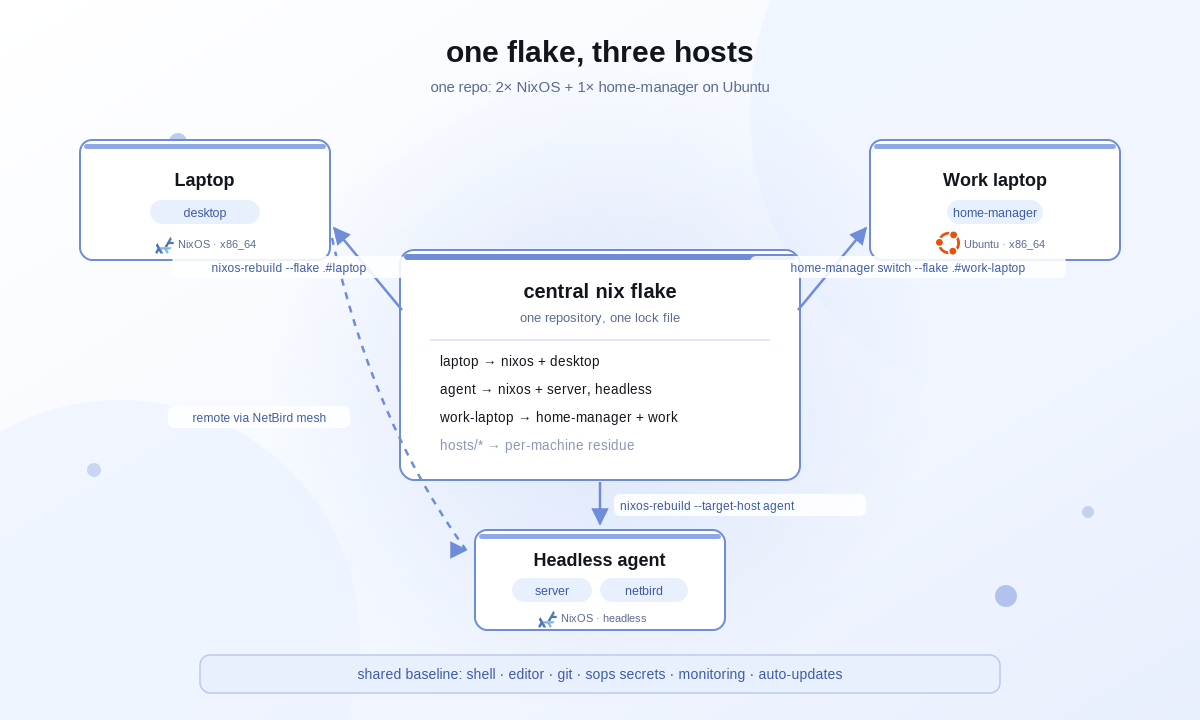
The shape of it#
Everything lives in one repository. The flake defines one nixosConfigurations entry per machine, and each entry is assembled from shared modules plus a small host-specific file:
# flake.nix (excerpt)
{
  inputs = {
    nixpkgs.url = "github:NixOS/nixpkgs/nixos-unstable";
    home-manager.url = "github:nix-community/home-manager";
    home-manager.inputs.nixpkgs.follows = "nixpkgs";
  };

  outputs = { self, nixpkgs, home-manager, ... }: {
    # full NixOS systems
    nixosConfigurations = {
      laptop = nixpkgs.lib.nixosSystem {
        system = "x86_64-linux";
        modules = [ ./hosts/laptop ./modules/common.nix ./modules/desktop.nix ];
      };
      agent  = nixpkgs.lib.nixosSystem {
        system = "x86_64-linux";
        modules = [ ./hosts/agent  ./modules/common.nix ./modules/server.nix ];
      };
    };

    # user environment on a non-NixOS machine (the Ubuntu work laptop)
    homeManagerConfigurations = {
      work-laptop = home-manager.lib.homeManagerConfiguration {
        pkgs = nixpkgs.legacyPackages.x86_64-linux;
        modules = [ ./hosts/work-laptop ./modules/home.nix ./modules/work.nix ];
      };
    };
  };
}
The split is the whole trick:
modules/common.nix— the NixOS baseline for the two NixOS machines: shell, editor, git identity, SSH client config, the monitoring agent, automatic updates policy. Change it once, both inherit it on the next rebuild.modules/home.nix— the same user-level baseline as a home-manager module: identical shell, editor, git and dotfiles on the Ubuntu work laptop, where system-level config is off limits.modules/desktop.nix— everything graphical: the window manager, terminal, browser, fonts. Only the personal laptop imports it.modules/server.nix— headless services: reverse proxy, container runtime, backup client. Only the agent imports it; it never sees a desktop module and boots to a plain multi-user system.modules/work.nix— the extra layer for the work laptop: VPN client, corporate CA certificates, work-specific tooling (as home-manager config on Ubuntu).hosts/<name>/— the per-machine residue:hardware-configuration.nix, hostname, users, disks, and the few settings that only make sense on that box.
Three machines, three kinds of config#
The three hosts have different jobs, and the config encodes exactly that:
- Laptop — full NixOS with a desktop. System and user environment are both declarative: packages, services, the window manager, all of it in Nix.
- Agent — full NixOS, headless. Same NixOS base, but the desktop module is simply not in its module list. No GUI, no display manager, everything on it is services.
- Work laptop — Ubuntu with home-manager. The base system is a corporate Ubuntu install I cannot replace, so only the user environment comes from the flake. home-manager manages shell, editor, git config, dotfiles and CLI tools in the home directory; system packages stay with apt.
All three still read from the same repository. The user-facing baseline is shared between common.nix and home.nix, so the machines feel identical to work on — even though underneath one is a full NixOS desktop, one is a headless NixOS server, and one is an Ubuntu box with a Nix-managed home directory.
A host file stays small precisely because everything shareable has been pulled up into a module. In practice it is mostly hardware config plus a handful of networking.hostName-style one-liners.
Building and deploying#
Local rebuild on the machine itself:
sudo nixos-rebuild switch --flake ~/nixos#laptopRemote deploy from any of the other machines, no need to be on the target:
# push the agent's config over SSH, from the laptop
sudo nixos-rebuild switch --flake ~/nixos#agent --target-host agent --use-remote-sudo
The flake attribute name is the deployment target. nixos-rebuild builds the configuration locally (or on a remote builder), copies the closure over SSH, and activates it on the target. The agent never needs a checkout of the repo on disk; it only receives the built result.
The work laptop is the odd one out: there is no nixos-rebuild, because there is no NixOS underneath. It runs on the machine itself and only manages the home directory:
home-manager switch --flake ~/nixos#work-laptopReaching the agent: NetBird mesh VPN#
The agent sits behind a connection with no public IP and no exposed ports. Instead of opening SSH to the internet, every host joins a NetBird mesh: NetBird is declared once in the common module, so the laptop, the work laptop and the agent are all peers in the same WireGuard-based network.
# modules/common.nix (excerpt)
services.netbird.enable = true;
The firewall on the agent accepts SSH only on the NetBird interface, so the mesh is the single way in. A deploy then targets the agent’s peer name instead of a LAN address:
sudo nixos-rebuild switch --flake ~/nixos#agent \
  --target-host <agent-peer-name> --use-remote-sudo
That is the whole remote story: no port forwarding, no dynamic DNS, no public IP. The agent stays reachable from anywhere, even behind NAT or a changing upstream address, because NetBird peers find each other through the coordination server. I self-host that server, so the mesh metadata never leaves my own infrastructure — at the cost of running one more service.
The same mesh is also just useful day to day: the laptops reach the agent’s services (backups, dashboards) over the same encrypted tunnel, without exposing anything publicly.
For anything more than three hosts, tools like colmena or deploy-rs wrap exactly this loop: colmena apply --on agent fans out the same flake to many machines in parallel and reports per-host results. The flake structure above does not change — only the command does.
What the shared modules actually contain#
The common module is where the “one source of truth” feeling comes from. Mine covers, in one place:
- shell and prompt, editor and its plugins, git defaults
- SSH client defaults and the agent setup
- secrets via sops-nix, so each host only decrypts the keys it is allowed to see
- the node exporter / monitoring agent pointed at the central instance
- unattended upgrades with a reboot policy that differs per host (laptops reboot freely, the agent reboots only in a maintenance window)
The NixOS machines share this module directly; the work laptop gets the user-level equivalent from home.nix. A fix to, say, the editor config ships to all three with the same commit. That is the entire point: no more “works on my laptop, forgotten on the server” — and no “works on my NixOS box, forgotten on the Ubuntu one”.
Advantages of spawning everything from one thing#
- Single source of truth. One
git commitchanges behavior on all machines. Review happens in one diff, not three. - A guaranteed common baseline. Shell, editor, secrets handling, monitoring — identical everywhere by construction, not by discipline.
- Same feel even on a non-NixOS machine. The home-manager output on the Ubuntu work laptop reuses the same dotfiles and settings, so switching machines does not mean re-learning your environment.
- Reproducibility. Any host can be rebuilt from scratch to a known state; the flake plus the lock file is the documentation of the machine.
- Cheap experiments. Try a new tool in
common.nix, rebuild one laptop, and if it is good, the other two get it for free. - Secrets stay declarative. With sops-nix, per-host keys are declared in the repo and encrypted in git; adding a secret to one host is a one-line change, not a manual SSH session.
- Remote management without extra tooling.
nixos-rebuild --target-hostturns the flake into a deploy mechanism; no Ansible, no agent to babysit. - The headless host needs no exposed ports. NetBird puts every machine on one encrypted mesh, so the agent is reachable from anywhere over its peer name while its firewall only accepts connections on the VPN interface.
Disadvantages and sharp edges#
- Blast radius. One bad commit in
common.nixcan break all three machines at once. Mitigation: rebuild and test on one host first, and keepcommon.nixchanges small and reviewable. - Divergence hides in the host files. The more logic creeps into
hosts/<name>/, the more the “single source” story frays. If a host file starts growing real config, that config probably belongs in a module with a condition. - Two package managers on the work laptop. System packages come from apt, user packages from Nix via home-manager. It works, but “where did this binary come from?” now has two answers on that machine, and system-level things like installing the corporate CA have to happen outside the flake.
- Build times. Three configurations means three evaluations and potentially three builds. A remote builder or shared binary cache keeps this from becoming painful.
- Remote deploy needs network and SSH. The agent is unreachable during a network outage, so its config cannot be fixed through the network at that moment. Keep a local fallback (a bootable USB with a known-good generation, or IPMI/out-of-band access) for exactly this case.
- The VPN becomes critical infrastructure. With NetBird in the path, a broken mesh means no remote deploys and no access to the agent’s services. Self-hosting the coordination server removes the third-party dependency but adds a service you have to keep alive — the same trade as any other self-hosted component.
- Secrets are per-host by design. sops-nix makes this manageable, but you still maintain an access policy per host, and a mis-scoped key is a real security bug, not a style issue.
- Debugging is cross-machine. “Why does the agent behave differently?” becomes a diff between module sets. Keep the module graph shallow — three layers (common → role → host) is plenty.
Wrap up#
- One flake:
nixosConfigurationsfor the NixOS machines (desktop laptop, headless agent) plus ahomeManagerConfigurationsentry for the Ubuntu work laptop — shared modules for everything shareable, a tiny host file for the rest. nixos-rebuild switch --flake .#<host>locally,--target-host <peer>over the NetBird mesh remotely; colmena/deploy-rs when the fleet grows.- Put NetBird in the common module and lock the firewall down to the VPN interface: the headless host stays reachable from anywhere without a single exposed port — but keep out-of-band access for the day the mesh itself is down.
- The win is the shared baseline and single-commit changes. The price is blast radius — so test on one host first and keep host files boring.