
For a while my home network had two routers in a row: the cable router sat in passthrough mode, and the mesh system behind it did everything else — DHCP, NAT, firewall, DNS, IPv6 delegation. It worked, until it didn’t.
Every few days the internet disappeared for about four minutes. Not a reboot, not a provider outage that lasted, just a clean gap and then everything came back on its own. The timing was too regular to be random and too short to be a real outage. After the usual round of guessing, I moved routing back to the cable router and turned the mesh system into a plain access point. That is the setup I should have started with.
Two routers, two places for the same problem#
The passthrough setup looks simple: the provider hands the connection to the cable router, which forwards it untouched to the mesh unit, and the mesh unit terminates it. In reality every packet that leaves the house crosses two devices that both have an opinion about the WAN link.
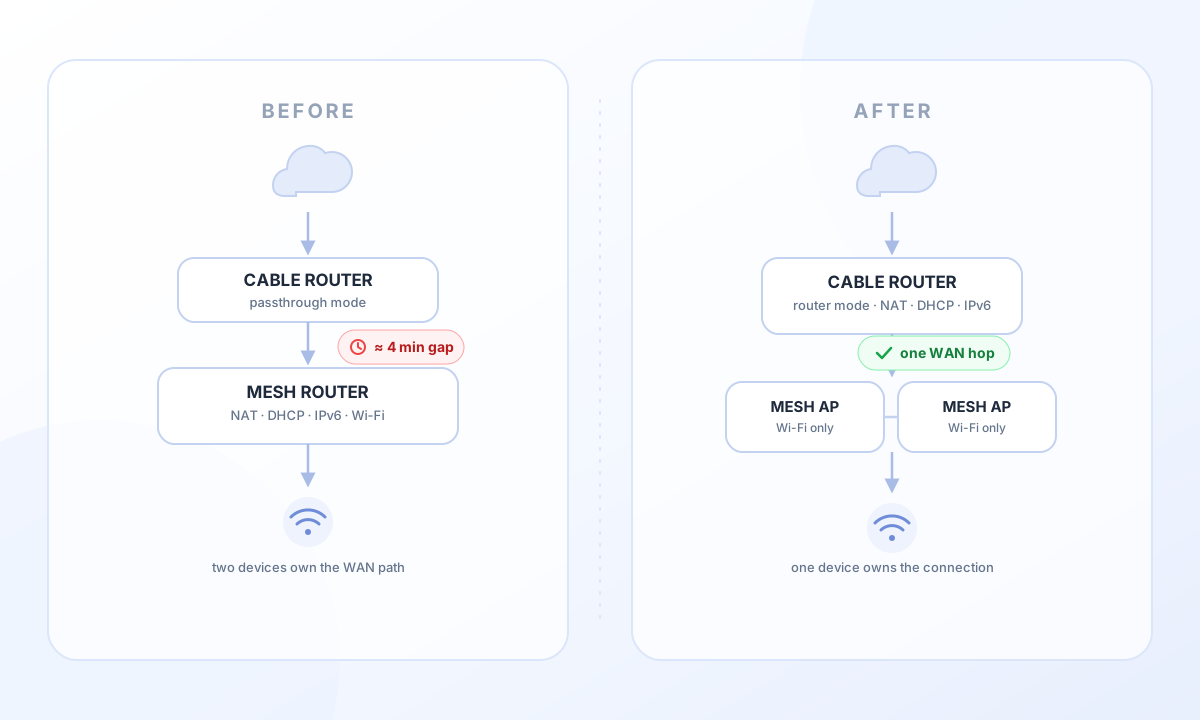
The WAN lease is the interesting part. The mesh unit holds it, but the cable router sits in between and has to forward the lease negotiation correctly. When the provider re-registers the cable router or pushes a new configuration, the passthrough path has to survive that transition. If it does not, the mesh unit starts a DHCP retry cascade — and those retry timers add up to exactly the kind of multi-minute gap I was seeing.
Worse, I could not see any of it. In passthrough mode the cable router does not answer on its management address. The cable statistics, the event log, the signal levels — all of it was unreachable from my LAN. I was debugging a connection while blindfolded, with a mesh app that only shows a green or red internet icon.
The change#
The new layout is boring on purpose:
- The cable router terminates the connection and does DHCP, NAT, firewall and IPv6 delegation.
- Both mesh units run in access point mode. They still form the mesh, still do roaming between nodes and still serve Wi-Fi — they just no longer route anything.
That is one hop in the WAN path instead of two, and the hop that owns the cable connection is also the one that handles it.
What it actually bought me#
One place for the WAN state. The lease now lives on the device that talks to the provider. There is no hand-off between the cable router and the mesh unit that can silently fail. If something goes wrong, it goes wrong in one place.
A supported default instead of a special mode. Passthrough is a feature vendors build for people who want to use their own router. It is not the path the provider tests. Running the cable router as a router is the normal case, and normal cases get the bug fixes.
Visibility into the cable layer. I can finally read the cable router’s event log and the cable statistics: error counters, timeouts, signal levels. That is the early-warning system for problems on the provider side. Without it, every outage is a mystery.
Tickets that go somewhere. When the provider sees a device it knows and supports on the line, the conversation changes. A support ticket with the cable router’s log and timestamps is a different ticket than “my router behind your device loses internet sometimes”.
A shorter IPv6 chain. Previously the provider delegated a prefix to the mesh system, which delegated again to the LAN. Now the router delegates directly and the access points are pure Layer 2. Fewer delegations mean fewer renewal timers, and prefix renewal between chained routers is a classic source of short outages.
Stable addresses again. The rebuild forced me to audit every DHCP reservation. Some of my self-hosted services had been running on whatever address they happened to get, and a couple of addresses had quietly been handed to unrelated devices. Moving the reservations to the router made service addressing explicit again.
Wi-Fi restarts no longer kill the internet. In access point mode a mesh unit that reboots costs a few seconds of Wi-Fi, nothing more. It does not take DHCP, NAT or the WAN lease with it.
What it took#
This is not a five-minute change, mostly because the interesting part happens before you touch anything.
Take inventory first. The mesh app cannot export its configuration, so I screenshotted the port forwards, the DHCP reservations, the dynamic DNS entry, the guest network settings and the IPv6 mode. Without that list, the rebuild turns into improvisation.
Get access to the cable router. This was the real hurdle. In passthrough mode the router’s management interface does not answer on the LAN, so there is no way to flip the mode from the network. The fallback is a factory reset, after which the device boots as a router and pulls its cable configuration from the provider again. That is the one irreversible-feeling step in the whole process, and it is worth knowing about before you start.
Change the mode, then rebuild the LAN. Router mode, DHCP enabled, and the address range set to what the mesh system used before. That way clients keep their familiar addresses instead of everything renumbering at once. The router’s own Wi-Fi gets disabled — the mesh units are the only radios in the house.
Test the connection before reconnecting anything. Once the router has a WAN address, verify IPv4, IPv6 and DNS resolution from a laptop on a cable. If that fails, stop there. Debugging a fresh router configuration while the whole house is offline is unnecessary pain.
Switch the mesh units to access point mode and reconnect them. They keep SSID, password, mesh topology and roaming behavior. They lose the routing features, which is the point.
Recreate the reservations. Infrastructure first, then services, then everything else. Devices that were powered off have to be booted before they can be reserved, otherwise they are missing from the router’s device list and will grab a random address on their next start.
Recreate port forwards and dynamic DNS, then test from outside. The public address can change during the rebuild. Testing from the mobile network instead of the home Wi-Fi is the step everyone forgets.
Watch it for a week. A rebuild is not proof. The point is to see whether the outages are gone, and if they are not, to have logs that show which layer failed.
What got worse#
Two things are worth naming.
The guest network is weaker. In router mode it had its own subnet, its own DHCP and real Layer-3 separation. In access point mode guests get addresses from the main network and the separation is client isolation inside the access point — software filtering, not a separate network. For a handful of visitors a year that is fine. For regular guests with unknown devices I would use the router’s own guest Wi-Fi instead, at the cost of enabling a second radio.
The router-mode extras of the mesh system are gone: the built-in antivirus and IoT protection, the failover feature, the per-device dashboard. Behind a router with a firewall those were nice-to-have, not load-bearing. Parental controls, QoS, the guest SSID and the mesh itself all still work.
And there is a small trap with DNS. Moving the DHCP server also moves the DNS setting, and on some router firmware the IPv4 DNS field is either hidden or missing entirely. If it is missing, pointing the router’s upstream at the local resolver is the workaround — at the cost of every client appearing as a single client in the resolver’s statistics, plus losing the fallback if the resolver is down.
Was it worth it?#
Yes — and not only because the regular outages are gone so far. The network is simpler to reason about: one device owns the connection, the mesh system owns the Wi-Fi, and neither pretends to be the other. Failures are localized, and the layer where problems actually happen is finally observable.
The general lesson is not about a specific brand. It is that a mesh system is very good at Wi-Fi and only adequate at being an edge router. If the router can route, let it route. The mesh has enough work to do.