
In my first post about the centralized backup setup the conclusion was comfortable: one backrest instance, a handful of sshfs mounts, every service covered by a single repository. That conclusion had a hole in it, and it took me months to notice.
The hole is quiet. restic has no idea how many files a backup source should contain. A backup of an empty directory is a perfectly valid backup, and backrest reports it as a success.
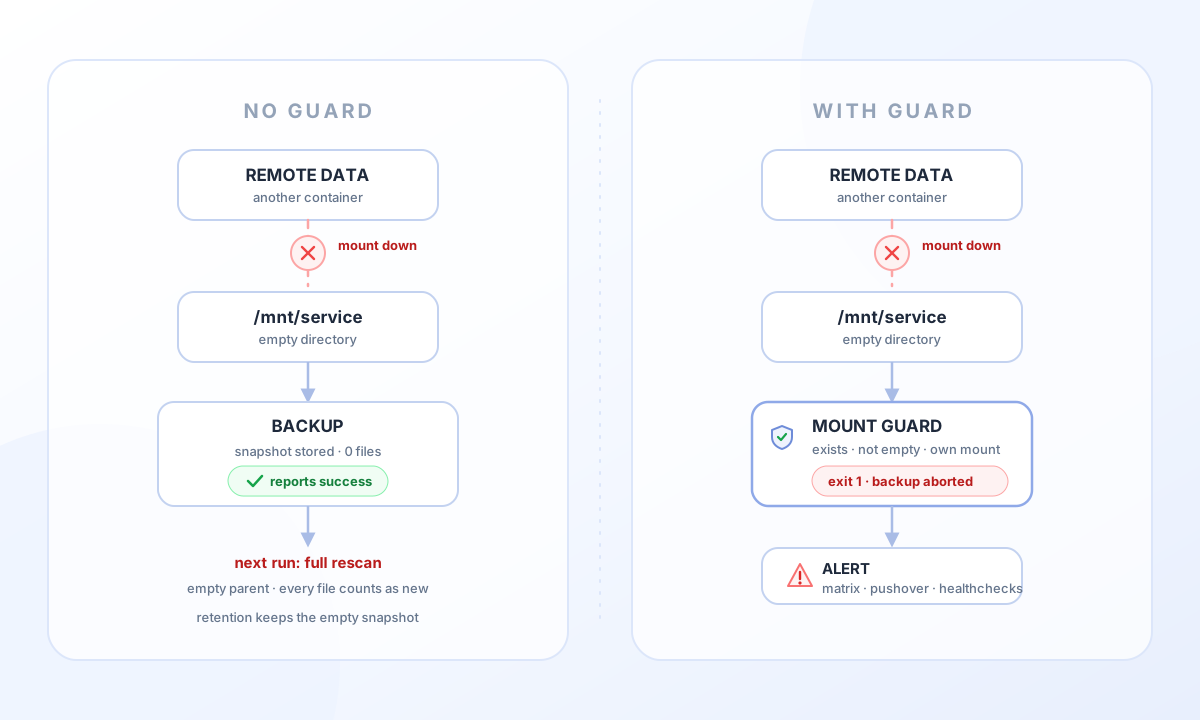
A backup of nothing is still a backup#
The failure chain looks like this:
- An sshfs mount silently goes away — the target container was down at boot, the network hiccuped, the mount was never established in the first place.
- The mount point is still there as an ordinary, empty directory on the backup host.
- restic walks that directory, finds nothing, and writes a snapshot containing exactly one empty tree.
- backrest marks the run as successful and pings the healthcheck.
From the outside everything is green. The plan has a fresh snapshot, the healthcheck is happy, the repository grows no further. The only weirdness is that the job that usually takes hours finished in four seconds.
And it gets worse on the next run. The empty snapshot is now the parent. restic assumes every file in the source is new, so it reads and hashes the entire dataset again — hours of scanning and a mountain of network traffic for a source that barely changed. The upload stays small because restic deduplicates against the existing chunks, which is exactly why nobody notices the scan either.
The last piece is retention. Time-bucketed retention happily keeps an empty snapshot as the snapshot of that month. If the mount stays broken, the plan accumulates a monthly history that looks like a backup history and contains nothing at all.
In my case the photo library had a real backup from one evening in the middle of an import, and before that: nothing for months. The rest of the services were fine, because their mounts came up correctly — but that was luck, not design.
Finding out whether it happened to you#
Two checks, both cheap.
The first one asks restic directly for snapshots that processed zero files:
restic snapshots --json \
  | jq -r '.[] | select((.summary.total_files_processed // 0) == 0) | .short_id'
Every hit is either an empty source or a snapshot that only captured the path shells. Both are worth a look.
The second one compares a snapshot against the live source, which also catches the case of a source that is only partially broken:
restic ls <snapshot-id> | wc -l
find /mnt/service | wc -l
The snapshot count should be a couple of entries higher, because restic stores the parent directories (/, /mnt, /mnt/service) as well. If the snapshot is missing thousands of entries, something is being skipped — permission errors, unreadable subdirectories, or a mount that is not what you think it is.
Both are worth running for every plan, not just for the one that looks suspicious.
The guard: fail before the snapshot instead of storing emptiness#
The fix is a small script that runs before restic touches the source. If the source does not look like a mount with content, the backup fails instead of producing an empty snapshot.
#!/bin/sh
# /usr/local/bin/mount-guard
set -eu

[ "$#" -gt 0 ] || { echo "mount-guard: no paths given" >&2; exit 2; }

for p in "$@"; do
  [ -d "$p" ] || { echo "mount-guard: $p missing" >&2; exit 1; }
  [ -n "$(ls -A "$p")" ] || { echo "mount-guard: $p empty (mount down?)" >&2; exit 1; }
  target=$(findmnt -n -o TARGET -T "$p")
  case "$target" in
    /mnt/*) ;;
    *) echo "mount-guard: $p not on a /mnt mount (target=$target)" >&2; exit 1 ;;
  esac
done

echo "mount-guard: ok: $*"
Three checks, each catching a different mistake:
- The path exists. A container that has been removed entirely should not look like a healthy backup source.
- It is not empty. A dead sshfs mount leaves exactly this: an existing, empty directory.
- It lives on its own mount under
/mnt. This one is easy to forget: if the fstab entry is gone but the directory is not, you are backing up whatever happens to sit on the local disk under that path.
Wiring it into backrest is a plan hook. In the plan settings, add a command hook with the condition snapshot start, onError set to fatal, and the plan’s paths as arguments:
/usr/local/bin/mount-guard /mnt/immichThe condition matters. CONDITION_SNAPSHOT_START runs before the snapshot is created, and only ON_ERROR_FATAL makes the failure abort the run. With the default ON_ERROR_IGNORE the guard exits non-zero, backrest logs it, and the backup proceeds anyway.
Plans with more than one path get all of them as arguments, so a partly broken source fails the run as well.
Do not let backrest start before the mounts#
The usual trigger is a reboot: backrest comes up, the sshfs mounts are still negotiating, and the first plan runs against empty directories. Ordering the unit after the mount units fixes that part:
[Unit]
After=network-online.target remote-fs.target mnt-immich.mount mnt-paperless.mount
After= only orders the start, it does not require the mounts. That is deliberate. RequiresMountsFor= would be the stronger guarantee, and it is also the wrong one here: with it, a single broken mount keeps backrest from starting at all, and then no backup runs and no notification is sent. One failing plan with a clear error message is much better than a daemon that quietly refuses to boot.
Enable the notifications#
The guard turns a silent data loss into a failed operation. That is only useful if the failure reaches you, so the second half of the fix is a notification hook.
Backrest hooks exist per plan and per repository. Repository-level hooks fire for every plan and for the repository maintenance tasks, so this is where a notification belongs — one entry instead of one per plan.
The Shoutrrr hook covers most messengers with a single URL format:
matrix://:ACCESS_TOKEN@homeserver.example/?rooms=!roomid:example.org
pushover://shoutrrr:API_TOKEN@USER_KEY/?priority=1
An access token instead of a bot password keeps the credential revocable, and matrix rooms work with !roomid:server directly.
The important part is the condition list:
CONDITION_ANY_ERROR— any failed operation, including the mount guard, prune, check and forget.CONDITION_SNAPSHOT_ERROR— a backup that failed outright.CONDITION_SNAPSHOT_WARNING— a partial backup. restic finished, but individual files could not be read. This is the event that catches a mount that is only half broken.
Set onError to ON_ERROR_IGNORE for the notification hook itself. A messenger that is unreachable should not turn a working backup into a failed one.
Keep success pings separate. I still send them to a healthcheck service, because that is the right tool for “did the job run at all”, while the messenger is for “the job ran and something is wrong”. Two channels, two purposes, no noise.
One thing to be aware of: a plan that produces a legitimate warning on every run will now notify on every run. Better to fix that warning than to filter it out — that is how I found a second silent failure in the same setup.
The other silent failure: skipped symlinks#
While checking why one plan reported a warning on every run, the message was:
incomplete metadata: readlink ...: operation not permittedThe files were symlinks, and sshfs refused to resolve them. Recent sshfs versions enable contain_symlinks by default: readlink returns EPERM for targets that are absolute or contain .., to stop a malicious server from steering local reads and writes. Applications that store metadata as relative symlinks — many object storage backends do — hit this on every run, and restic skips those entries with a warning.
If the server is your own and the mount is read-only, the containment is not buying you much:
server:/data /mnt/storage fuse.sshfs ro,reconnect,_netdev,no_contain_symlinks,IdentityFile=/root/.ssh/id_ed25519 0 0After a remount the warnings were gone and the entries ended up in the snapshot. Worth checking with readlink on one of the paths from the error message before changing mount options.
Test both directions#
A guard that never fails is untested. Two runs, five minutes:
- Point a throwaway plan (or a temporarily renamed path) at a source that does not exist and trigger a backup. Expect a failed operation with the guard message, and expect the notification to arrive.
- Trigger a backup of a healthy plan. Expect a normal snapshot.
That is how I confirmed the hook order, the abort, and the Matrix message — the failure text in the message even contains the guard’s output, which makes the cause obvious at a glance.
Wrap up#
- A successful backup is not proof that data was saved. restic will happily store an empty tree and call it a snapshot.
- Check for zero-file snapshots and compare snapshot entry counts against the live source once in a while.
- Guard the source before the backup runs: exists, non-empty, on its own mount. Abort on failure with
ON_ERROR_FATAL. - Order backrest after the mount units, but do not couple its start to them.
- Enable notifications at the repository level, covering errors and partial backups, and keep the notification hook non-fatal.
- On sshfs, check
contain_symlinksif restic reportsreadlink: operation not permitted.
The backup setup from the first post still holds. It just needed a seatbelt.